
How to Split a PDF into Separate Documents Automatically
By the PDFPUMA team · Published · 2 min read
Use Smart split PDF: choose a rule — start a new document at every page containing text such as "Tax invoice", at blank separator pages, or every N pages — check the proposed documents, then export them as a ZIP. If you only need fixed page ranges, the free Split PDF does that.
The problem: one PDF, many documents
Office scanners make it easy to scan a whole stack of paper in one go — 40 invoices, a month of delivery dockets, a box of client statements. The result is one long PDF, when what you actually need is one file per document. Splitting by hand means scrolling through every page and typing page ranges.
Three ways to find where each document starts
| Rule | Best for | Needs a text layer? |
|---|---|---|
| Pages containing text (e.g. "Tax invoice") | Invoices, statements, forms whose first page always says the same thing | Yes — run OCR first on scans |
| Blank separator pages | Stacks scanned with a blank sheet between documents | No |
| Every N pages | Documents that are always the same length | No |
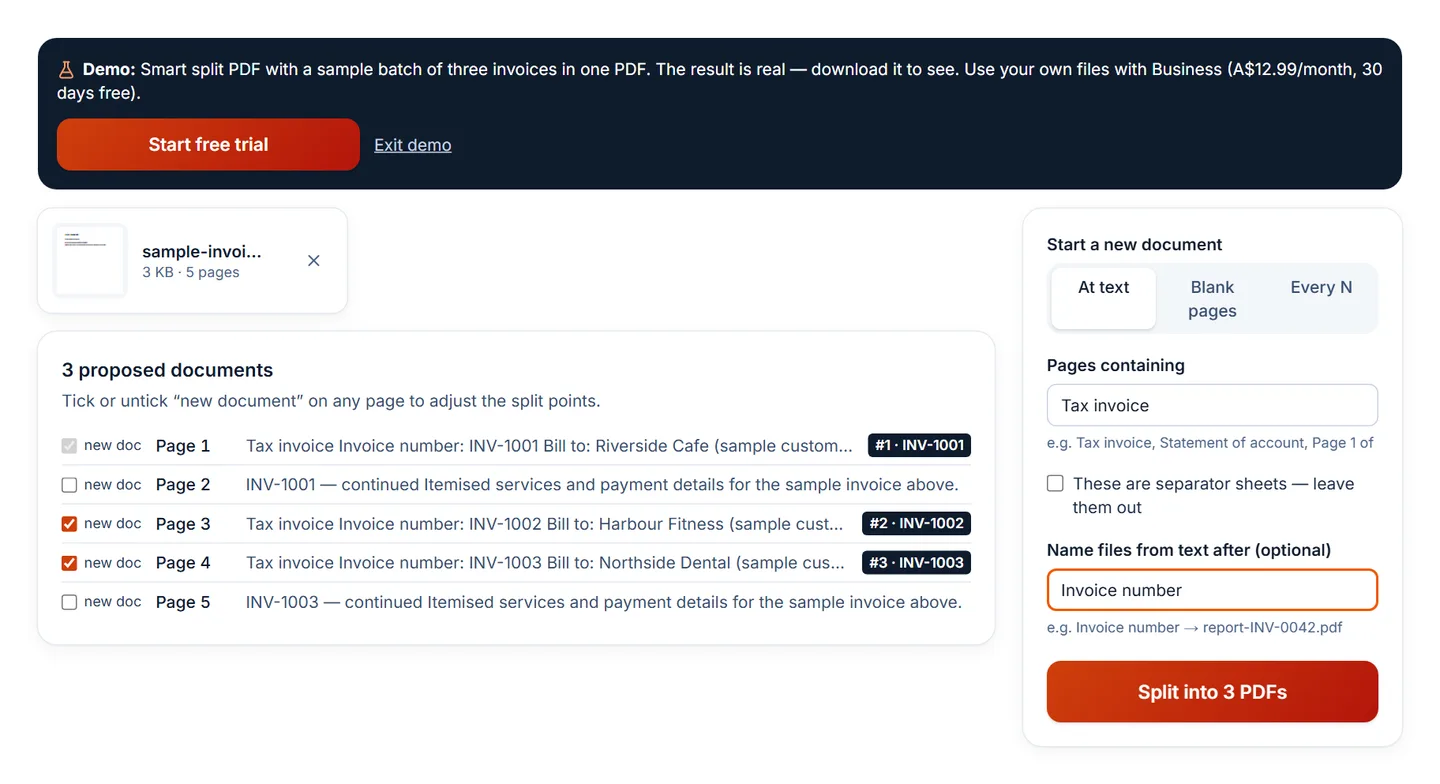
With the text rule you can also tell PDFPUMA that the matching pages are separator sheets to leave out, and name each file from text on its first page — for example the value after "Invoice number".
Step by step
- Open Smart split PDF and add the PDF.
- Choose At text and type the phrase that appears on each document's first page — or choose Blank pages or Every N.
- Optionally type a label under Name files from text after, such as "Invoice number".
- Check the list of proposed documents. Tick or untick new doc on any page to move a split point.
- Select Split into N PDFs and download the ZIP.
Scanned PDFs without text
Text rules read the words on each page. Many scans are just pictures of pages, so there are no words to read. Either make the scan searchable first with OCR PDF, or scan with blank sheets between documents and use the blank-page rule — that works on any scan.
No splitter can find boundaries perfectly in every file. That's why PDFPUMA always shows its proposal and lets you adjust it before anything is created.
Questions
Which plan includes Smart split?
Business (A$12.99/month, with a 30-day free trial for new subscribers) and Agency. The basic Split PDF is free.
Are my files uploaded?
No. Reading the pages, finding boundaries and creating the files all happen in your browser.